Basic Shell scripting commands
Creating a
.shfileGiving execute permission using
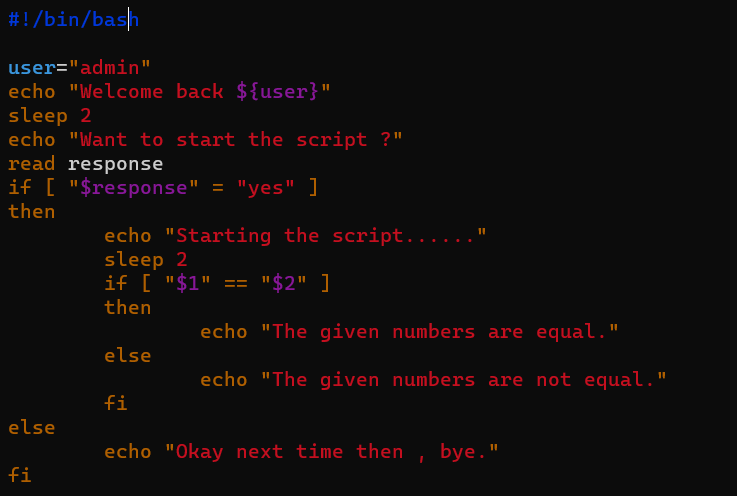
chmod 777 <filename>777 represent read write and execute.
Adding
#!/bin/bashin.shfile as the beginning of a script or executable file , we can also use#!/bin/shwhich selects the default system shell.running the script using
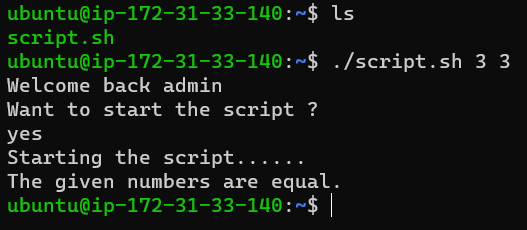
./<filename>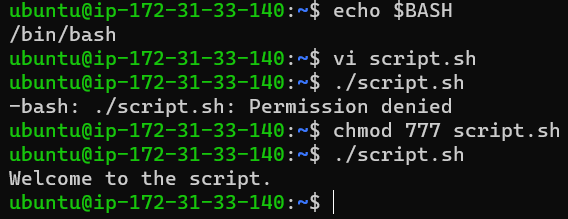
echo:
echois used to display the string on the console.
variable: define a variable using
=operator without any spaces.eg: name="Bharat"
sleep: used to hold the execution for the defined number of seconds.
argument: arguments passed from the console are used using $ followed by its count.
if else :
general syntax :
if [ "parameter1" condition "parameter2" ]
then
statement
else
statement
fi